
Translation grid
The translation grid is a spreadsheet-grade view of every translatable element in your org. It’s built to scale to tens of thousands of rows and stay responsive.
Columns
Section titled “Columns”- Type — custom field, picklist, layout, validation rule…
- Key — the Salesforce metadata key (read-only)
- Source — your default-language string
- Target — the string for the currently selected language, editable
Filters
Section titled “Filters”The filter sidebar on the left lets you narrow by type, object, language, and “missing translations only”. Filters compose — you can ask for “custom field labels on the Account object, missing Italian translations” in three clicks.
Search
Section titled “Search”The search box on top is substring-matching and live. It searches both source and target.
Keyboard shortcuts
Section titled “Keyboard shortcuts”| Shortcut | Action |
|---|---|
↑ / ↓ | Move between rows |
Enter | Edit current row |
Esc | Discard unsaved edit |
⌘/Ctrl + S | Save current workspace |
⌘/Ctrl + F | Focus search |
⌘/Ctrl + Shift + A | Select all visible rows |
⌘/Ctrl + D | Mark row as “done” (reviewed) |
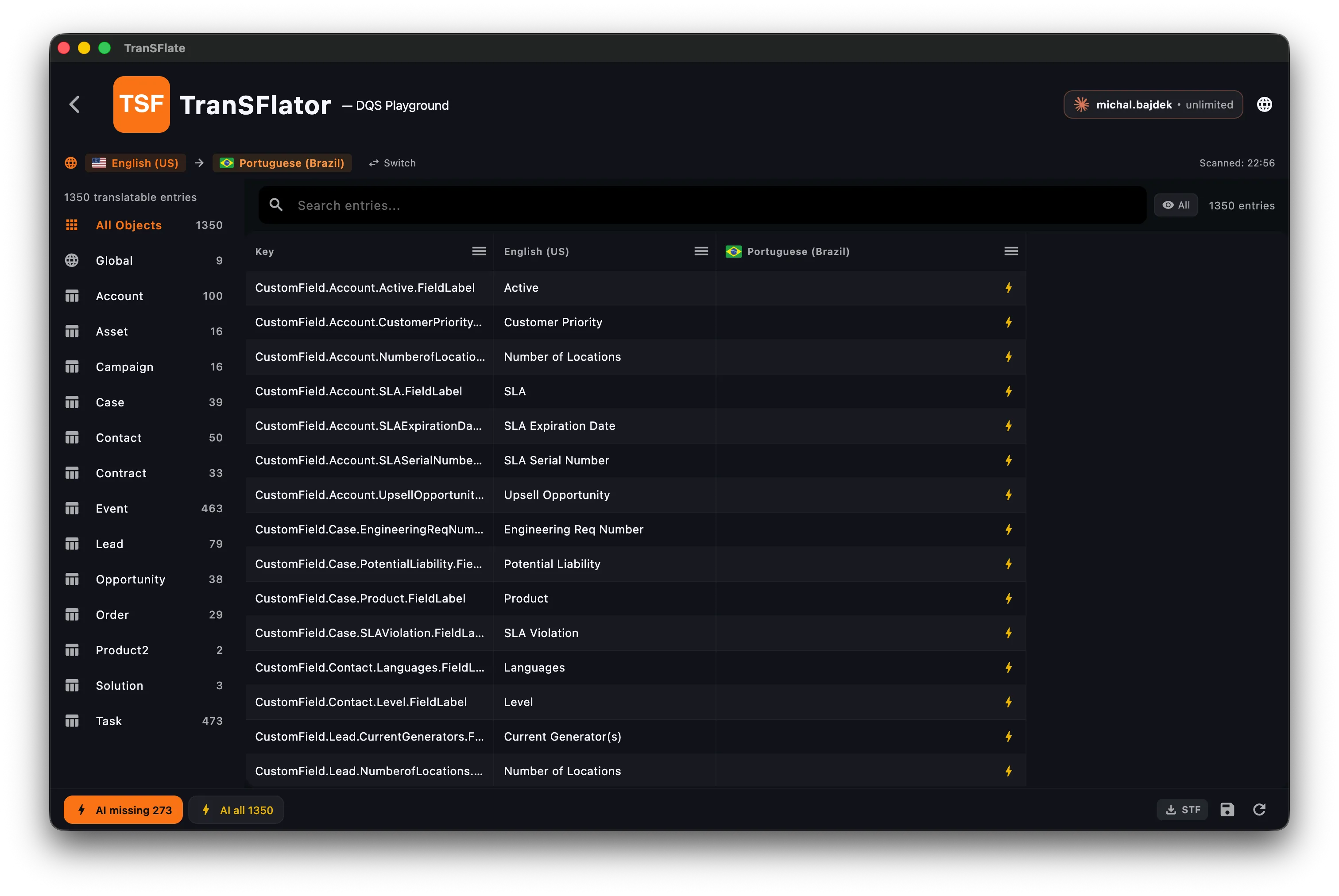
The left sidebar groups every translatable element by Salesforce object (Account, Case, Contact, …) with a running count so you always know how much is left.